🚀 Claude Code 从入门到精通
终端中的超级 AI 编程助手 | Agentic Coding 的标杆产品
"Most software engineers are seriously sleeping on how good LLM agents are right now, especially something like Claude Code."
代码、配置、工作流全部可定制,打造属于你的 AI 编程超级队友
🔧 安装方式
macOS / Linux (推荐)
curl -fsSL https://claude.ai/install.sh | bash
Homebrew
brew install --cask claude-code
旧版 npm (已废弃)
npm install -g @anthropic-ai/claude-code
🖥️ 多环境使用
OrbStack 容器
orb -m ubuntu -u root
mise 环境管理
curl https://mise.run | sh
mise use node
npm install -g @anthropic-ai/claude-code
Windows: 使用 WSL2
📁 CLAUDE.md 项目记忆
位置优先级:
.claude/CLAUDE.md./CLAUDE.md(项目根目录)~/.claude/CLAUDE.md(全局)
推荐内容:
- 常用 bash 命令
- 代码风格指南
- 测试指令
- 仓库规范
- 环境配置
自动生成: /init 命令
⚙️ settings.json 配置
位置: .claude/settings.json
{
  "model": "claude-sonnet-4",
  "hooks": {
    "Stop": [{
      "hooks": [{
        "type": "command",
        "command": "afplay notification.mp3"
      }]
    }]
  },
  "permissions": {
    "allow": ["Bash(ls:*)", "Edit"],
    "deny": ["Bash(rm:*)"]
  }
}
📋 常用斜杠命令
| 命令 | 功能 |
|---|---|
/init |
生成 CLAUDE.md |
/compact |
压缩上下文 |
/clear |
清空上下文 |
/ide |
连接 IDE |
/permissions |
权限管理 |
/export |
导出对话 |
/agent |
子代理模式 |
/plugin |
插件管理 |
⚡ 快捷键
| 快捷键 | 功能 |
|---|---|
Ctrl+R |
展开收缩内容 |
Shift+Tab |
切换 Plan Mode |
Escape |
中断当前操作 |
Escape×2 |
回退历史编辑 |
\ + Enter |
换行输入 |
# |
记忆模式 |
! |
执行命令模式 |
🧠 思考强度控制
触发 Extended Thinking:
| 关键词 | 强度 |
|---|---|
think |
基础 |
think hard |
中等 |
think harder |
高 |
ultrathink |
最高 |
ultrawork |
最高 |
每级分配更多思考预算
🎯 权限模式
YOLO 模式 (危险)
claude --dangerously-skip-permissions
精细化权限
/permissions
规则语法:
Edit- 允许编辑Bash(git commit:*)- 允许 gitBash(rm:*)- 禁止删除
🌐 MCP 架构
┌─────────────┐
│ Claude Code │
└──────┬──────┘
       │ MCP Protocol
┌──────▼──────┐
│  MCP Server │ (本地桥接)
└──────┬──────┘
       │ API Call
┌──────▼──────┐
│ External API│
│ JIRA/GitHub │
└─────────────┘
配置文件: .mcp.json
📦 常用 MCP 服务器
Issue Tracking
@anthropic/mcp-jira@anthropic/mcp-linear
Code & DevOps
@anthropic/mcp-github@anthropic/mcp-sentry
Communication
@anthropic/mcp-slack
Database
@anthropic/mcp-postgres
Browser
@playwright/mcp
📝 MCP 配置示例
{
  "mcpServers": {
    "jira": {
      "type": "stdio",
      "command": "npx",
      "args": ["-y", "@anthropic/mcp-jira"],
      "env": {
        "JIRA_HOST": "${JIRA_HOST}",
        "JIRA_EMAIL": "${JIRA_EMAIL}",
        "JIRA_API_TOKEN": "${JIRA_API_TOKEN}"
      }
    }
  }
}
🎓 什么是 Skills
Skills 是教会 Claude 项目特定模式的 Markdown 文档
位置: .claude/skills/{name}/SKILL.md
作用:
- 代码风格规范
- 测试模式
- API 设计规范
- 组件库使用方式
- 调试方法论
核心理念: 让 Claude 生成的代码开箱即用,符合团队规范
📄 SKILL.md 格式
---
name: testing-patterns
description: Jest 测试模式
allowed-tools: Read, Grep, Glob
model: claude-sonnet-4
---

# Testing Patterns

## When to Use
- 编写测试时
- TDD 工作流

## Core Patterns
### AAA 模式
Arrange → Act → Assert
🏷️ Frontmatter 字段
| 字段 | 必填 | 说明 |
|---|---|---|
name |
✅ | 小写+连字符 |
description |
✅ | 触发描述 |
allowed-tools |
❌ | 允许工具 |
model |
❌ | 指定模型 |
最佳实践:
- 保持 < 500 行
- 包含代码示例
- 写明反模式
🎯 示例 Skills
| Skill | 用途 |
|---|---|
testing-patterns |
TDD、工厂函数、Mock |
systematic-debugging |
四阶段调试法 |
react-ui-patterns |
Loading/Error/Empty 状态 |
graphql-schema |
查询、变更、Codegen |
core-components |
设计系统、Token |
formik-patterns |
表单处理、验证 |
🔍 Skill 自动评估系统
触发时机: UserPromptSubmit Hook
分析维度:
- Keywords: 简单词匹配
- Patterns: 正则匹配
- File Paths: 文件路径提取
- Intent: 意图检测
置信度评分:
- keyword: 2分
- pathPattern: 4分
- directoryMatch: 5分
- intentPattern: 4分
🕵️ Agents 专项助手
位置: .claude/agents/{name}.md
格式:
---
name: code-reviewer
description: 代码审查专家
model: opus
---

# Agent System Prompt

你是一位资深代码审查员...

## 审查流程
1. 运行 `git diff`
2. 应用审查清单
3. 提供反馈
📋 示例 Agents
| Agent | 用途 |
|---|---|
code-reviewer |
综合代码审查 |
github-workflow |
Git 操作专家 |
security-auditor |
安全审计 |
performance-optimizer |
性能优化 |
documentation-writer |
文档编写 |
触发: Claude 自动识别或手动调用
⚡ Custom Commands
位置: .claude/commands/{name}.md
调用: /project:{name} 或 /{name}
变量:
$ARGUMENTS- 全部参数$1,$2,$3- 位置参数
内联 Bash:
当前分支: !`git branch --show-current`
📋 示例 Commands
| Command | 用途 |
|---|---|
/onboard |
深度任务探索 |
/ticket |
JIRA 工作流 |
/pr-review |
PR 审查 |
/pr-summary |
生成 PR 描述 |
/code-quality |
质量检查 |
/docs-sync |
文档同步 |
示例: /ticket PROJ-123
🎣 Hook 事件类型
| 事件 | 触发时机 | 用例 |
|---|---|---|
PreToolUse |
工具执行前 | 阻止危险操作 |
PostToolUse |
工具执行后 | 自动格式化 |
UserPromptSubmit |
用户提交 | 添加上下文 |
Stop |
Agent 结束 | 播放通知音 |
Notification |
通知时 | 桌面提醒 |
📤 Hook 响应格式
{
  "block": true,
  "message": "阻止原因",
  "feedback": "非阻塞反馈",
  "suppressOutput": true,
  "continue": false
}
Exit Codes:
0- 成功2- 阻塞错误 (仅 PreToolUse)- 其他 - 非阻塞错误
🛡️ 安全 Hook 示例
禁止在 main 分支编辑:
{
  "hooks": {
    "PreToolUse": [{
      "matcher": "Edit|Write",
      "hooks": [{
        "type": "command",
        "command": "[ \"$(git branch)\" != \"main\" ]",
        "timeout": 5
      }]
    }]
  }
}
🔔 通知音效 Hook
{
  "hooks": {
    "Stop": [{
      "hooks": [{
        "type": "command",
        "command": "afplay ~/Sounds/done.mp3"
      }]
    }],
    "Notification": [{
      "hooks": [{
        "type": "command",
        "command": "afplay ~/Sounds/notify.mp3"
      }]
    }]
  }
}
✨ 自动格式化 Hook
{
  "hooks": {
    "PostToolUse": [{
      "matcher": "Edit|Write",
      "hooks": [{
        "type": "command",
        "command": "prettier --write $FILE"
      }]
    }]
  }
}
应用场景:
- 代码格式化
- 运行 linter
- 类型检查
🧪 测试触发 Hook
{
  "hooks": {
    "PostToolUse": [{
      "matcher": "Edit",
      "hooks": [{
        "type": "command",
        "command": "if [[ $FILE == *.test.* ]]; then npm test -- $FILE; fi"
      }]
    }]
  }
}
测试文件修改后自动运行测试
🤖 PR 自动审查
name: PR - Claude Code Review
on:
  pull_request:
    types: [opened, synchronize]
  issue_comment:
    types: [created]

jobs:
  review:
    runs-on: ubuntu-latest
    steps:
      - uses: anthropics/claude-code-action@beta
        with:
          anthropic_api_key: ${{ secrets.ANTHROPIC_API_KEY }}
          model: claude-opus-4-5-20251101
          prompt: "Review this PR..."
📅 定时任务
| 工作流 | 周期 | 用途 |
|---|---|---|
| Code Quality | 每周日 | 随机审查目录 |
| Docs Sync | 每月1号 | 文档对齐 |
| Dependency Audit | 每两周 | 依赖更新 |
预估月成本: $10-50 (取决于 PR 数量)
💰 成本估算
| 工作流 | 频率 | 成本 |
|---|---|---|
| PR Review | 每 PR | $0.05-0.50 |
| Docs Sync | 每月 | $0.50-2.00 |
| Dep Audit | 双周 | $0.20-1.00 |
| Quality | 每周 | $1.00-5.00 |
节省: 大量人工审查时间
🔄 Explore → Plan → Code → Commit
-
探索: 阅读相关文件
- 告诉它"不要写代码"
- 使用 subagent 深入调查
-
计划: 让 Claude 制定方案
- 使用 "think" 触发深度思考
- 创建计划文档
-
编码: 实现方案
-
提交: 生成 PR
🧪 TDD 工作流
-
写测试: 基于预期输入输出
- 明确告知是 TDD
- 避免 mock 实现
-
验证失败: 确认测试失败
-
提交测试: 满意后提交
-
写代码: 让测试通过
- 不修改测试
- 迭代直到全部通过
-
提交代码
🖼️ 视觉迭代工作流
-
给 Claude 截图能力
- Puppeteer MCP
- iOS Simulator MCP
-
提供设计稿
- 拖放图片
- 粘贴截图
-
实现 → 截图 → 对比 → 迭代
-
满意后提交
🎫 Ticket 工作流
/ticket PROJ-123
- 从 JIRA 获取 ticket 详情
- 读取验收标准
- 搜索相关代码
- 创建功能分支
- 实现功能
- 更新 JIRA 状态
- 创建 PR 并链接 ticket
🔀 Multi-Claude 工作流
方式一: 写/审分离
- Claude A 写代码
/clear或新终端- Claude B 审查代码
- Claude C 根据反馈修改
方式二: Git Worktrees
git worktree add ../feature-a
cd ../feature-a && claude
📊 Headless 自动化
批量处理:
claude -p "migrate foo.py" \
  --allowedTools Edit \
  --output-format json
流水线集成:
claude -p "analyze" --json \
  | your_command
🎮 Vibe Coding
定义: Claude Code + 语音输入 + 纯自然语言
全自动实现功能,很少看代码,只看最终效果
三员大将:
claude --dangerously-skip-permissions
codex --sandbox workspace-write --ask-for-approval never
gemini -m gemini-3-flash-preview --yolo
安全措施: brew install trash && alias rm='trash'
🔌 第三方工具生态
用量监控
ccusage/claude-code-monitor
状态栏
CCometixLine(Rust)
音效
zelda-claude-code
可视化界面
Claudia
路由器
claude-code-router
🔗 IDE 集成
VS Code / Cursor:
- 安装 Claude Code 插件
- 终端输入
/ide
优势:
- IDE 选中代码 → Claude 感知
- Claude 改动 → IDE 显示 diff
- 双向实时同步
Plan Mode: Shift+Tab 切换
📖 LSP 实时智能
启用:
{
  "enabledPlugins": {
    "typescript-lsp@claude-plugins-official": true,
    "pyright-lsp@claude-plugins-official": true
  }
}
能力:
- 实时错误诊断
- 类型信息
- 代码导航
- 智能补全
📂 项目配置结构
your-project/
├── CLAUDE.md                    # 项目记忆 (可选位置)
├── .mcp.json                    # MCP 服务器配置
├── .claude/
│   ├── settings.json            # Hooks, 环境, 权限
│   ├── settings.local.json      # 个人覆盖 (gitignore)
│   ├── settings.md              # Hook 文档
│   ├── .gitignore
│   ├── agents/                  # 自定义 AI Agents
│   │   └── code-reviewer.md
│   ├── commands/                # 斜杠命令
│   │   ├── onboard.md
│   │   ├── pr-review.md
│   │   └── ticket.md
│   ├── hooks/                   # Hook 脚本
│   │   ├── skill-eval.sh
│   │   ├── skill-eval.js
│   │   └── skill-rules.json
│   └── skills/                  # 领域知识
│       ├── README.md
│       ├── testing-patterns/
│       │   └── SKILL.md
│       └── react-ui-patterns/
│           └── SKILL.md
└── .github/
    └── workflows/
        ├── pr-claude-code-review.yml
        ├── scheduled-claude-code-docs-sync.yml
        ├── scheduled-claude-code-quality.yml
        └── scheduled-claude-code-dependency-audit.yml
版本控制:
- ✅ 提交: settings.json, agents, commands, skills
- ❌ 忽略: settings.local.json, CLAUDE.local.md
up:: AI Code 编程 - moc up:: ∑ MCP与AI工具链 related:: claude code 配置, claude code plugins 插件, claude code 第三方中转站
指定模型名
/model o1
cc mate claude code plugins 插件
安装
macos linux通用
curl -fsSL https://claude.ai/install.sh | bashbrew install --cask claude-code旧的依赖于npm命令, 已经被官方废弃。
npm install -g @anthropic-ai/claude-code别人的配置参考
各种第三方插件
塞尔达音效
npm install -g zelda-claude-code@latest状态栏
GitHub - Haleclipse/CCometixLine: Claude Code statusline tool written in Rust

在多个子环境中使用
orb -m ubuntu -u root如果使用非root模式,则安装有点麻烦。如果使用root,则无法使用 claude 的疯狂模式。
curl https://mise.run | sh

echo "eval \"\$(/root/.local/bin/mise activate bash)\"" >> ~/.bashrc

source ~/.bashrc

mise trust

mise use node

npm install -g @anthropic-ai/claude-code

npm install -g @musistudio/claude-code-router
npm install -g @anthropic-ai/claude-code使用claude-code-router绕过官方限制。或者使用各种第三方的中转站: claude code 第三方中转站
常用快捷键
control + r展开被收缩的文本,以查看详情。
常用命令
如果命令不适应,使用开源的可视化界面也不错Claudia
/init命令
先创建claude说明文件。本仓库的范例:CLAUDE
/compact 把信息用简单的语法总结一下
压缩上下文,但总觉得会失真,不一定好用,倒不如另起一个对话呢
/clear
清空上下文
控制模型思考强度
官方说明的,在对话前面加think,让其思考强度更高
think
think hard
think harder
ultrathink
ultrawork 也行
记忆模式
输入#号触发
和ide联动编辑
/ide
好处:
vscode中选中代码,则cc里面能感知
cc改的代码,ide里面能看到diff
一次性对话
但其实不如直接用warp的ai命令了。
claude -p “今天您吃了吗”
ccr也是支持的,命令就是ccr code -p "今天您吃了吗"
前面加!,临时用于执行命令,而不是自然语言提问。
权限控制
危险模式,让其全自动驾驶
也叫yolo模式?
claude --dangerously-skip-permissions精细化控制
/permissions
规则文档:Identity and Access Management - Anthropic
可以直接把文档丢给ai,让ai生成规则行。
自定义命令
不通用,考虑直接使用系统级别的比如raycast 的snippet更好。
Create custom slash commands by adding .md files to .claude/commands/ in your project or ~/.claude/commands/ for commands that work
in any project
导出内容
/export
- 复杂问题,使用 plan mode ,切换快捷键 shift + tab
- 连接到ide,比如cursor。
- cursor中安装claude code。
- cc中输入/ide进行连接。
- 输入
\ + 回车可以换行- 有些软件里的命令行,支持
shift + 回车换行,如果不行,就用\+回车换行
- 有些软件里的命令行,支持
- 使用
shift + tab切换到plan mode- 这样 claude 会先与你过一下开发计划,然后再去开发,结果更可控
hook配置
Get started with Claude Code hooks - Anthropic
写完后自动进行lint检查等
通知音效
telegram 和folo频道推荐
找到让 Claude Code 完成时提醒我的办法了,最优雅的方式是配置 Claude Code 的 hooks,让它每次完成时播放音效。
编辑设置文件 ~/.claude/settings.json
{
  "model": "Qwen/Qwen3-235B-A22B-Thinking-2507",
  "hooks": {
        "Stop": [
            {
                "hooks": [
                    {
                        "type": "command",
                        "command": "afplay ~/Sounds/notification.mp3"
                    }
                ]
            }
        ],
        "Notification": [
            {
                "hooks": [
                    {
                        "type": "command",
                        "command": "afplay ~/Sounds/notification.mp3"
                    }
                ]
            }
        ]
  },
  "permissions": { "allow": [ "Bash(ls:*)", "ReadFile:*", "Edit" ], "deny": [ "Bash(rm:*)", "Bash(sudo:*)" ] }
}
sub agent
map reduce, 子agent是并行执行的,会获取精简的上下文。 /agent
其他常用参数
使用其他模型
kimi v2用于claude code-官方token-不用ccr的情况下
参考教学视频
我的理解
什么叫vibe coding
claude code + 语音输入 + 纯自然语言描述,让它全自动化实现特性、修改bugfix。并且很少或几乎不看代码改动,直接全盘接受改动,只要最终代码看着能运行既可,
vibe coding,就是如码,好像写了代码又好像没写
技巧
yolo模式打开,让其全自动运行。但是又怕rm -rf之类的操作。
brew install trash alias rm='trash'资深软件工程师的用法
来源: Andrej Karpathy
氛围编码
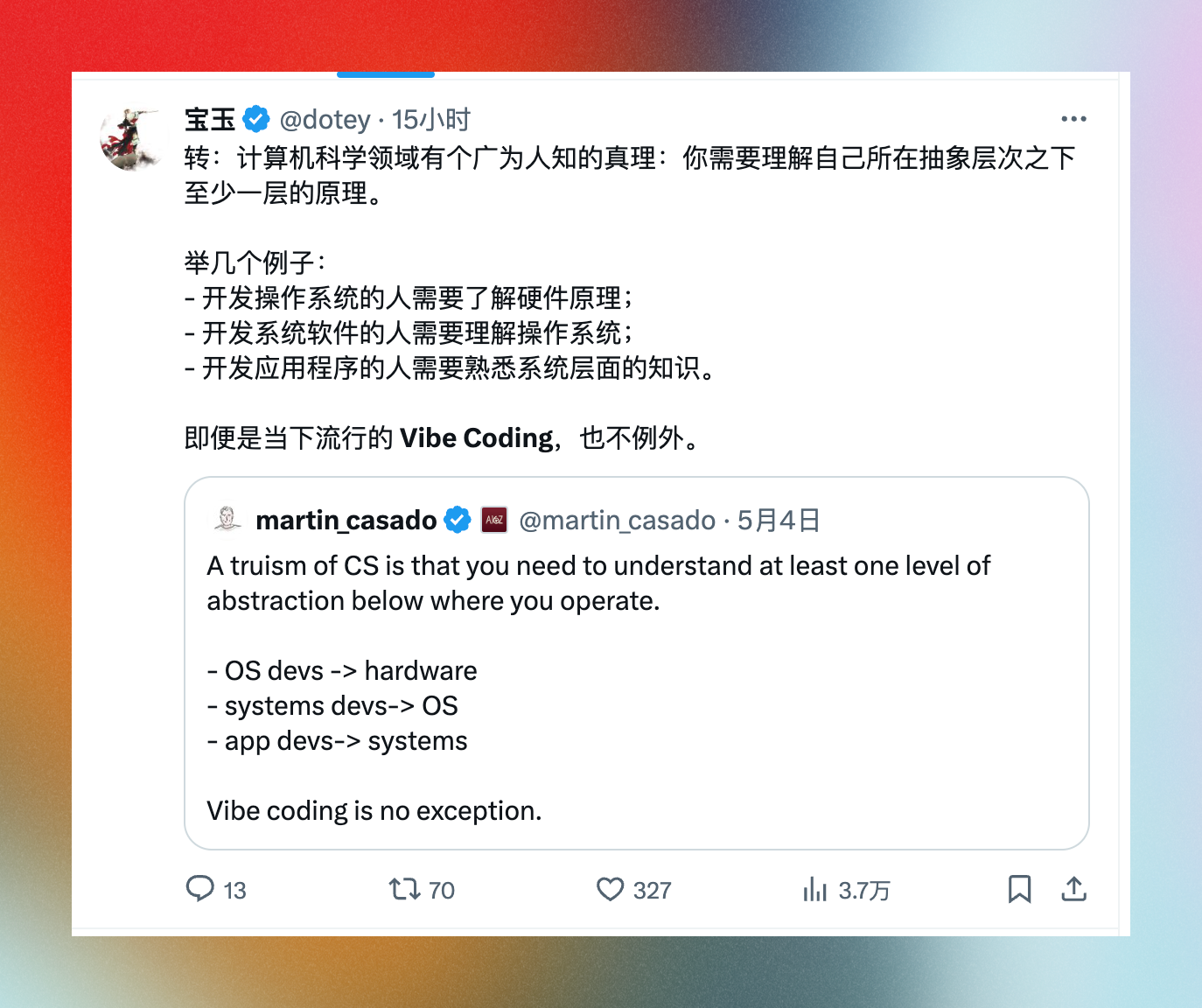
vibe coding到底需不需要计算机知识。
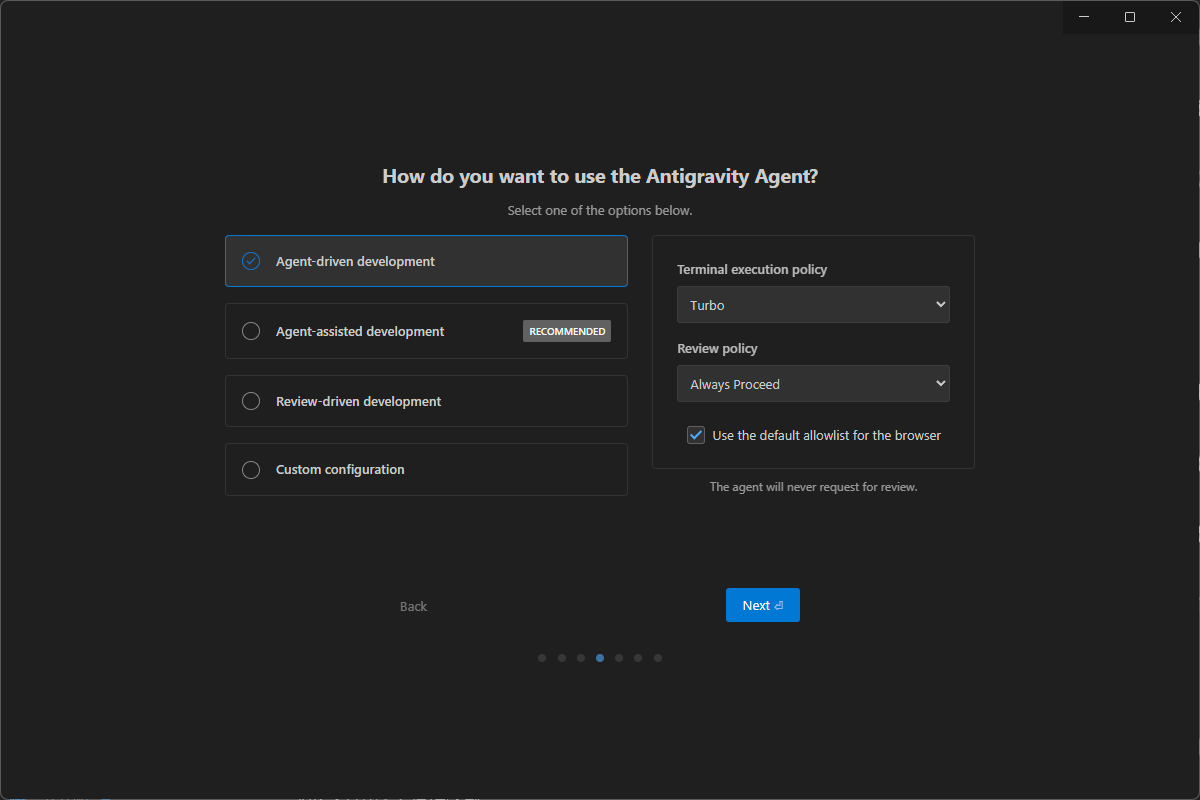
google ide antigravity对ai开发的3个定义:
vibe coding
我手下的三员大将
claude —dangerously-skip-permissions
codex —sandbox workspace-write —ask-for-approval never
gemini -m gemini-3-flash-preview —yolo